Showing posts with label Facebook. Show all posts

Wednesday, November 22, 2017

Black Friday Facebook Event

Black Friday Facebook Event

Shopping on Black Friday, ugh.  You either love it or avoid it. My goal for this year is to make your holiday shopping as easy as possible. This holiday Avon event will include gift ideas, stocking stuffers, bundling suggestions and anything else I can think of to make lots of checks off your gift list.

Black Friday Facebook Event

Black Friday Event Details

$20+ Orders get Free Shipping*
$45+ Orders get Free Shipping and 20% Off**
$65+ Orders get Free Shipping, 20% Off and Free 7-Piece Holiday On-the-Go Set***

  • * Free shipping offer valid for mail delivery order only. To redeem, select standard shipping and enter coupon code: AVONBLACK, expires 11:59 PM PT, 11/25/2017. Offer does not apply to express shipping methods and is valid only for shipping addresses in the contiguous United States. Alaska and Hawaii addresses are subject to additional surcharges.
  • ** Discount offer valid for mail delivery orders only, and expires at 11:59 PM PT, 11/25/2017. Please enter coupon code AVONBLACK at checkout. Order must meet specified offer criteria after any sitewide discounts have been applied to qualify. No adjustments to prior purchases. Limit one product and coupon code per order.
  • *** Free gift offer valid for mail delivery orders only and while supplies last. To redeem, enter coupon code: AVONBLACK, expires 11:59 PM PT, 11/25/2017. Order must meet specified offer criteria after any sitewide discounts have been applied to qualify. No adjustments to prior purchases. Free gift item is non-refundable and limit one product and coupon code per order. Avon reserves the right to substitute any free item offered with an item of equal or greater value.

How this Event works

Visit and Join the Event  here.  The facebook event will begin at 5:00 on 11/24 with a "Welcome" post followed by information on the details of special offers, free shipping codes and discounts on your order. This event is for online orders only from my eStore youravon.com/denisekrupa.  Please use code: AVONBLACK at checkout to receive the special offers. The event will conclude at 8:00 pm on 11/24.
ANY QUESTIONS PLEASE MESSAGE ME! HAVE FUN SHOPPING!

Thursday, April 13, 2017

Tips for New Representatives

Editing your new eStore

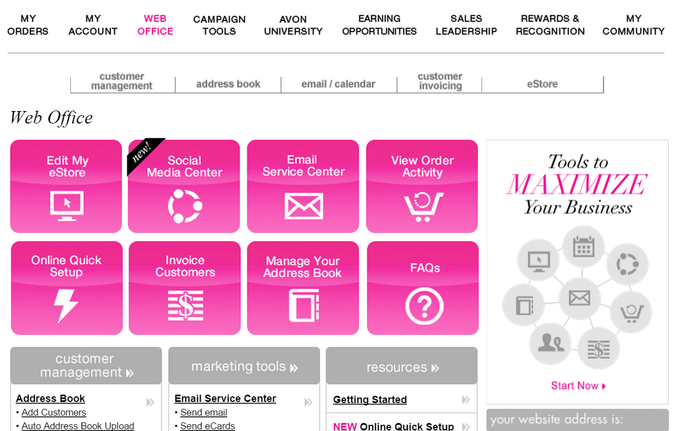
Once you have set up your eStore at yourAvon.com, you can edit the "storefront" to focus on your own style and marketing goals. First navigate to your web office. It looks like this with the "Web Office" highlighted in the main menu. There is so much you can do in your office, so it would be beneficial to spend some time here and get used to all it attributes. Today let's focus on the eStore. 


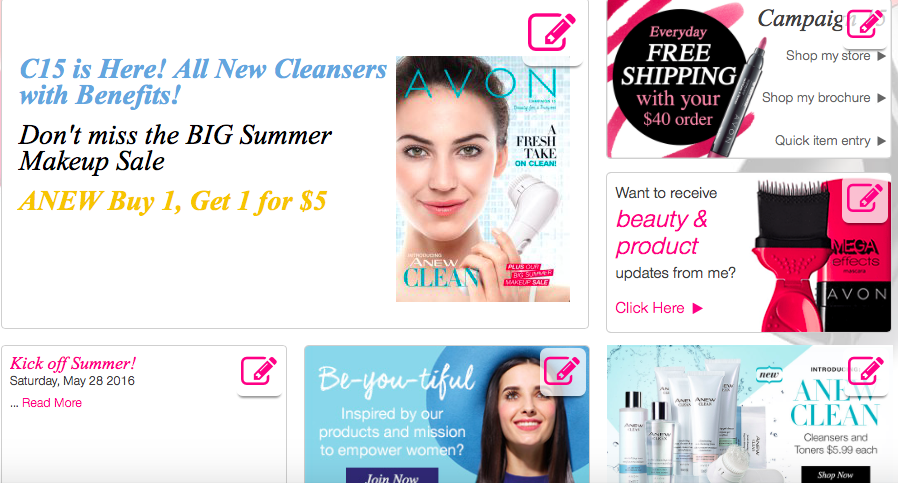
There are two ways to edit your eStore. 1. In the sub-menu you will see eStore at the far right and it's drop down menu will have an option to edit, or 2. the shortcut can be used. It's the first pink box. Once you get to the eStore, you will see the storefront which has general information, including widgets for products, recruiting, etc. Each of these widgets can be edited to fit your style of marketing, by clicking the pink box with pencil in the upper right hand corner.


This is my eStore. As you can see I like to change the main frame to match the current campaign with some text for specials or information I think will interest my customers.  I like to keep the Campaign Widget for easy links to my store, brochure or quick entry, and the update widget collects information from my customers so I can send them email specials. I also use the Blog or Twitter widget, The Be-you-tiful widget to sign up new representatives on my Team, and of course a product widget to keep my customers up to date with new products. You can customize your eStore however you like. Get creative!

Saturday, January 14, 2017

Valentine's Day Facebook Event

Valentine's Day Facebook Event


Join me on January 22, 2017 for a Facebook Valentine's Day Party. Click the link above to rsvp the event and start earning points to win a prize. The event will start at 8 AM and continue throughout the day until 10 PM. Products will be delivered directly to you from Avon, in time for Valentine's Day. 

How it works:

1. Enter the event
2. Check back throughout the day (Jan 22) for new posts
3. Posts will stay up throughout the event so you won't miss anything. 
4. Posts will include % off sales, beauty tips, skin care information and lots and lots of products for Valentine's Day. For Women and Men. 
5. Click on a post that interests you and shop my eStore. Yes I get credit for all sales!
6. Earn points starting today for a chance to win So Very Sophia fragrance, body lotion and shower gel. Here's how to accumulate points:

3= Each comment you make
5= Each question you ask
7= Participate in a game
10= Invite a friend
15= Place an order
20= Like my Avon/Denise Facebook page
25= Be first to place an order at the event
50= Place $100 order
Comments and questions must be on the event post so I can keep track of your points AND so others may benefit from your comments. 

I will post a few games to play and also give you the opportunity to win more gifts!
Come join me on Jan 22, it should be great fun!
Share this event with others and invite them to join. Great way to shop from the comfort of your home with friends!

Thursday, April 28, 2016

Sell Avon Online

Selling Avon OnLine using Social Media

     There are many social media avenues to take these days, and selling Avon using these platforms is a great way to find new customers and share in your excitement about selling Avon. Whether you are tech savvy or not, social media is part of our everyday lives. The sooner we embrace the idea, the sooner we can get our marketing strategies in place and start to get results.  I have been using Facebook and Twitter to market my Avon business, and of course Blogger, and I would like to share some tips that may be helpful to other representatives. 

     Let's start with Facebook. The first step is to set up a separate Facebook page for your business. This is quite easy and it allows you to post whenever you want without annoying anyone on your personal page. Update your cover photo with a nice picture from Avon (I have the Matte Lipsticks) and of course a picture of you. Follow Me on Facebook to see what I'm doing. Those that are interested in Avon will "like" your page and stay up to date on what you are posting about new products, beauty tips, specials or whatever information you would like your customers to have. Each campaign, I post the new brochure cover with the link to my eStore. (Let me know if you need help setting up your eStore). I also post current code offers that usually come monthly, right from Avon. I have found that posting all the offers at once is a little overwhelming, so I have started posting separate offers based on the dates due. Make sure you state when the offer expires to cover yourself, and I usually try to post a picture of the item offered. Visit your WebOffice at Avon.com to find posts that you can share directly to Facebook. It will prompt you where to share, and I choose "share to a page you manage" option. That will go directly to my business page. 
     One more thing about marketing your business on Facebook, and this is totally optional. You have the choice of "boosting" your posts. What this means is paying for your posts to be reached by more people outside your family and friends. I only do this on my business page and I have been successful with reaching new people interested in my page. You set your own budget, duration of the boost, and your target audience. You can also stop the boost at any time. Again this is optional and you may have enough Facebook followers that you don't have to spend any extra money. As an example, I boosted the C9 brochure cover,  and got 100 new followers, that to me are potential customers! I paid $35 for one week which was well within my marketing budget. 
     Let's move on to Twitter. I usually use Twitter to share posts directly from Avon. You can add some text that makes it a little more personal. The more followers you have, the more potential customers. I usually share my eStore at least once per week, and current product information is always what seems to interest people. So keep it short and sweet, and most of all interesting and relevant to your business. 
     As you probably have gathered, I love to share ideas and information through my Blogs. If you haven't done so yet, set up a Blog and post often. It can be on your Avon website or any other Blog site. The Avon Blog is somewhat limited because you can't add pictures unless you know HTML coding, and the text is sometimes crunched together vs. neat spacing and indenting, again unless you know HTML coding. I am going to put together an informative blog about this at a later date. Subscribe to my Blog and watch for it. Whatever you choose, have fun with it! Your customers will appreciate it too!

I am adding a link to my eStore HERE for you to see what my store looks like and the Avon Blog. Use the Avon Media Center to share posts often. 

Summary of Social Media Tips:
1. Set up a Facebook page for your Avon business
2. Post often, "Short and Sweet", eye-catching pictures
3. Share posts from Avon Media Center, including your eStore
4. Boost your posts, only if it's in your budget.
5. Use Twitter to share posts relevant to your Avon business
6. Share your eStore on Twitter
7. Set up a Blog


SELL AVON please use reference code: denisekrupa to join my team